
AntiDupl is a free duplicate image finder for Windows that scans your photo library and identifies duplicate or near-duplicate images with remarkable accuracy. Unlike simple hash-based duplicate finders, AntiDupl uses image comparison algorithms that can detect visually similar photos even when they differ in resolution, compression, or minor edits.
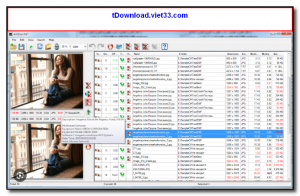
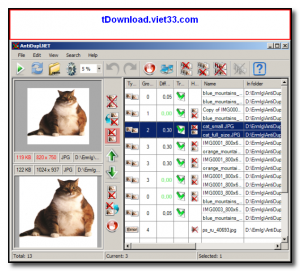
The program displays results in a side-by-side comparison view, letting you quickly evaluate which image to keep and which to delete. It supports a wide range of image formats including JPEG, PNG, BMP, GIF, TIFF, and WebP, making it suitable for cleaning up large, mixed photo collections.
AntiDupl is especially useful for photographers and digital archivists who accumulate thousands of images over time and need a reliable, fast tool to identify and remove redundant copies without manual checking.
Key Features
- Detects exact and visually similar duplicate images using perceptual comparison algorithms
- Side-by-side comparison view to evaluate and choose which duplicate to keep or delete
- Supports JPEG, PNG, BMP, GIF, TIFF, WebP, and other common image formats
- Filters by similarity threshold to control how aggressively duplicates are matched
- Batch delete, move, or rename detected duplicates from within the interface
- Scan multiple folders simultaneously including subfolders
- Fast scanning engine capable of handling tens of thousands of images efficiently
How to Install
- Click the download button below to get the AntiDupl installer or portable ZIP.
- Run the installer or extract the portable version to any folder.
- Launch AntiDupl and add the folders you want to scan for duplicate images.
- Configure the similarity threshold and file format filters, then click Start to begin scanning.
- Review the results in the comparison view and delete or move unwanted duplicates as needed.
Frequently Asked Questions about AntiDupl – Free Duplicate Image Finder for Windows
Is AntiDupl – Free Duplicate Image Finder for Windows free?
AntiDupl – Free Duplicate Image Finder for Windows is completely free to download and use — no registration or payment required.
What are the system requirements for AntiDupl – Free Duplicate Image Finder for Windows?
Minimum requirements: Windows7,8,10,11. A modern PC with at least 2GB RAM is recommended.
What is the latest version of AntiDupl – Free Duplicate Image Finder for Windows?
The latest version is 2.3.9, updated on 29/10/2025.
Is AntiDupl – Free Duplicate Image Finder for Windows safe to download?
Yes. All software listed on download.viet33.com is sourced directly from the official developer and verified before publishing. No bundled adware or malware.
Does AntiDupl – Free Duplicate Image Finder for Windows work on Windows 11?
Yes, AntiDupl – Free Duplicate Image Finder for Windows is compatible with Windows7,8,10,11, including Windows 11.
 Download DesktopCalendar 2.3.108.5601
87 Downloads
Download DesktopCalendar 2.3.108.5601
87 Downloads
 Download Hard Disk Sentinel 6.40
73 Downloads
Download Hard Disk Sentinel 6.40
73 Downloads
 Download Windows 10
57 Downloads
Download Windows 10
57 Downloads
 Download Sound Booster 1.2
57 Downloads
Download Sound Booster 1.2
57 Downloads
 Download 3DP Chip 26.06
70 Downloads
Download 3DP Chip 26.06
70 Downloads


