
Carrying a favorite uninstaller around on a USB stick comes in handy more often than you’d think, and that’s exactly the case for people who download Revo Uninstaller Portable. It’s the same leftover-hunting engine as the installed edition, just packaged so it runs directly from a flash drive or a cloud folder with nothing written to the host machine’s registry.
Techs who service multiple computers, or anyone who doesn’t want a permanent install, tend to keep this version on hand for quick, thorough program removals wherever they go.
Key Features of Revo Uninstaller Portable
- Runs with zero installation, launch it straight from a USB drive
- Same Advanced/Moderate/Safe scan modes as the full version
- Finds and removes leftover files, folders, and registry entries after uninstalling
- Forced Uninstall mode for stubborn or partially broken program entries
- Leaves no trace on the host PC once you’re done
- Ideal for technicians working across many different machines
Screenshot / Demo
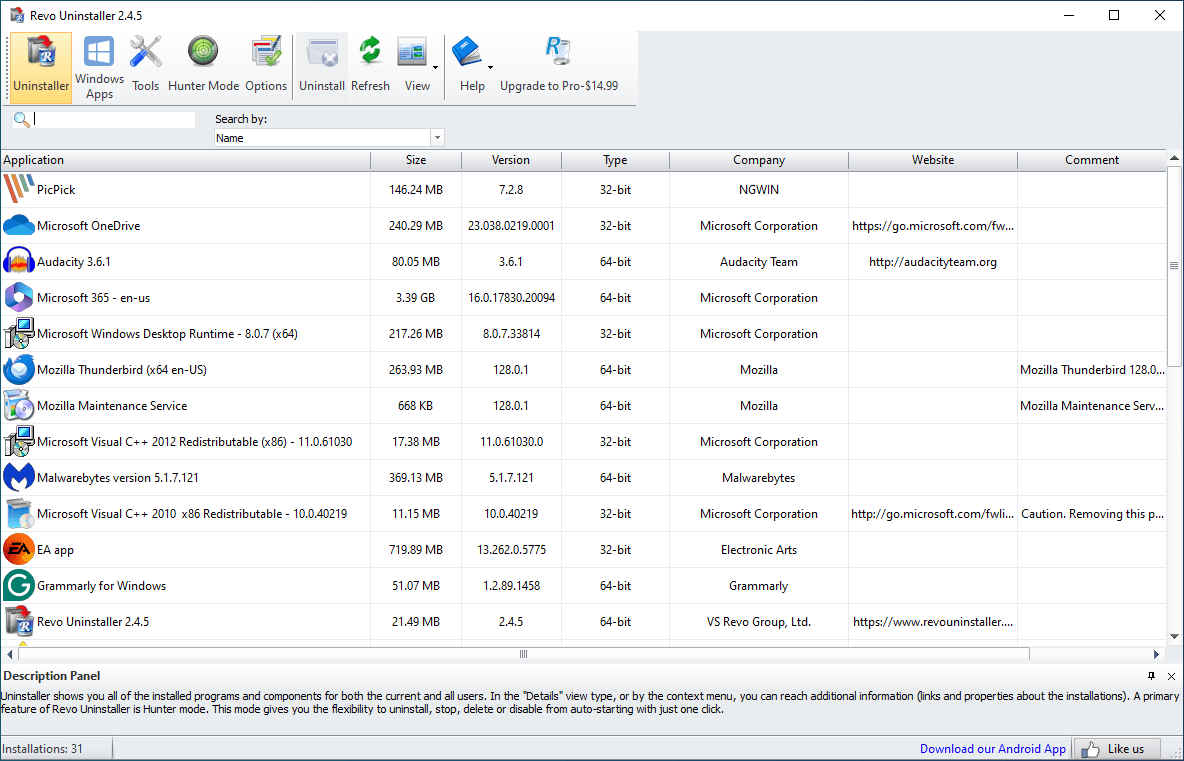
How to Install Revo Uninstaller Portable
- Click the download button to get the Revo Uninstaller Portable ZIP file.
- Extract the ZIP file to a USB drive or any folder of your choice.
- Open the extracted folder and run the executable file directly.
- No setup wizard needed, the program opens right away.
- Enjoy using Revo Uninstaller Portable!
 Download FurMark 2.10.2
8 Downloads
Download FurMark 2.10.2
8 Downloads
 Download CrystalDiskInfo 9.9.2
8 Downloads
Download CrystalDiskInfo 9.9.2
8 Downloads
 Download UniKey 4.6 RC2
37 Downloads
Download UniKey 4.6 RC2
37 Downloads
 Download PC Health Check
55923 Downloads
Download PC Health Check
55923 Downloads
 Download HiBit Uninstaller
22823 Downloads
Download HiBit Uninstaller
22823 Downloads

