
Download Video Edit Master and start editing your videos with a straightforward, beginner-friendly tool designed for users who want powerful results without a complex learning curve. Video Edit Master provides all the essential editing features you need to cut, trim, merge, add effects, and export polished videos in just a few simple steps.
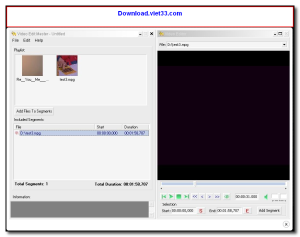
Whether you are creating content for social media, compiling family memories, or putting together a quick promotional clip, Video Edit Master delivers a smooth editing experience on any Windows PC. The clean interface keeps all the tools within easy reach, so you can focus on your creativity rather than navigating complicated menus.
For simple yet effective video editing that anyone can master immediately, Download Video Edit Master today and start producing great-looking videos right away.
Key Features of Video Edit Master
- Cut, trim, and split video clips with frame-accurate precision to remove unwanted sections.
- Merge multiple video clips into a single seamless video with smooth transitions between scenes.
- Add text overlays, titles, and captions with customizable fonts, sizes, and colors.
- Apply visual filters and effects to enhance the mood and style of your footage.
- Background music support with volume control and audio fade in/out options.
- Export videos in popular formats including MP4, AVI, and WMV for wide compatibility.
- Simple drag-and-drop timeline that makes arranging clips fast and intuitive.
How to Install Video Edit Master
- Click the Download button below to get the Video Edit Master installer.
- Run the setup file and follow the on-screen installation wizard.
- Choose your installation directory and click Install.
- Launch Video Edit Master from your desktop shortcut.
- Enjoy using Video Edit Master!
Frequently Asked Questions about Video Edit Master
Is Video Edit Master free?
Video Edit Master is completely free to download and use — no registration or payment required.
What are the system requirements for Video Edit Master?
Minimum requirements: Windows7,8,10,11. A modern PC with at least 2GB RAM is recommended.
What is the latest version of Video Edit Master?
The latest version is 2.0, updated on 09/02/2026.
Is Video Edit Master safe to download?
Yes. All software listed on download.viet33.com is sourced directly from the official developer and verified before publishing. No bundled adware or malware.
Does Video Edit Master work on Windows 11?
Yes, Video Edit Master is compatible with Windows7,8,10,11, including Windows 11.
 Download DesktopCalendar 2.3.108.5601
87 Downloads
Download DesktopCalendar 2.3.108.5601
87 Downloads
 Download Hard Disk Sentinel 6.40
73 Downloads
Download Hard Disk Sentinel 6.40
73 Downloads
 Download Windows 10
57 Downloads
Download Windows 10
57 Downloads
 Download Sound Booster 1.2
57 Downloads
Download Sound Booster 1.2
57 Downloads
 Download 3DP Chip 26.06
71 Downloads
Download 3DP Chip 26.06
71 Downloads


