
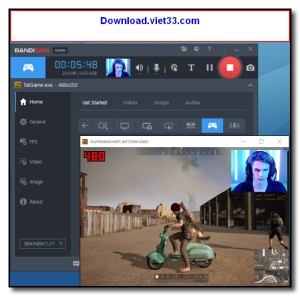
Bandicam is a lightweight yet professional screen recorder and game capture software for Windows that lets you capture high-quality video of your screen, games, and external devices with minimal impact on system performance. It is particularly popular among gamers and content creators for its ability to record DirectX, OpenGL, and Vulkan-based games at high frame rates.
With Bandicam, you can record in up to 4K UHD resolution, stream directly to YouTube or Twitch, add webcam overlays for face-cam recording, and annotate your recordings in real time with drawing tools. Its hardware-accelerated encoding ensures smooth recordings even during demanding gaming sessions.
Whether you are creating game footage, tutorials, webinars, or software demos, Bandicam provides the quality and performance that professional content creators demand.
Key Features
- Record games, desktop, and external devices in up to 4K UHD resolution
- Hardware-accelerated encoding (NVIDIA NVENC, AMD VCE, Intel QSV) for minimal CPU usage
- Game recording mode with FPS counter and overlay display
- Webcam overlay for face-cam recording during gameplay
- Real-time drawing and annotation tools during screen recording
- Direct streaming to YouTube and Twitch via RTMP
- Scheduled recording and automatic file splitting for long sessions
How to Install
- Click the download button above to get the Bandicam installer.
- Run the setup file and follow the on-screen instructions to install.
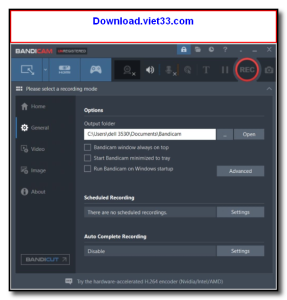
- Launch Bandicam and select your recording mode: Screen, Game, or Device.
- Configure your output settings (resolution, format, FPS, and audio).
- Click the Record button (or press F12) to start and stop your recording.
Frequently Asked Questions about Bandicam
Is Bandicam free?
Bandicam offers a free trial period. Full features may require a paid license.
What are the system requirements for Bandicam?
Minimum requirements: Windows7,8,10,11. A modern PC with at least 2GB RAM is recommended.
What is the latest version of Bandicam?
The latest version is 8.2.2, updated on 18/12/2025.
Is Bandicam safe to download?
Yes. All software listed on download.viet33.com is sourced directly from the official developer and verified before publishing. No bundled adware or malware.
Does Bandicam work on Windows 11?
Yes, Bandicam is compatible with Windows7,8,10,11, including Windows 11.
 Download DesktopCalendar 2.3.108.5601
87 Downloads
Download DesktopCalendar 2.3.108.5601
87 Downloads
 Download Hard Disk Sentinel 6.40
73 Downloads
Download Hard Disk Sentinel 6.40
73 Downloads
 Download Windows 10
57 Downloads
Download Windows 10
57 Downloads
 Download Sound Booster 1.2
57 Downloads
Download Sound Booster 1.2
57 Downloads
 Download 3DP Chip 26.06
71 Downloads
Download 3DP Chip 26.06
71 Downloads


