
ShareX is a free, open-source screen capture and screen recording tool for Windows that is packed with an extraordinary range of features. From basic screenshots to advanced workflows, ShareX handles everything — full-screen capture, region selection, scrolling capture, screen recording, GIF creation, and much more.
What sets ShareX apart is its powerful post-capture workflow system: after capturing, you can automatically annotate, watermark, compress, and upload your screenshots to over 80 image hosting services including Imgur, Google Drive, Dropbox, and custom FTP servers — all in one seamless workflow.
Completely free, open-source, and without any ads or limitations, ShareX is the ultimate productivity tool for developers, content creators, and power users who need professional-grade screen capture capabilities.
Key Features
- Capture full screen, window, region, or scrolling content with one shortcut
- Screen recording to video or animated GIF with no time limits
- Built-in image editor with annotation, highlighting, and blur tools
- Automatic upload to 80+ hosting services after capture
- OCR text recognition from screenshots
- Color picker, ruler, and other productivity tools built in
- Completely free and open-source — no ads, no watermarks, no limits
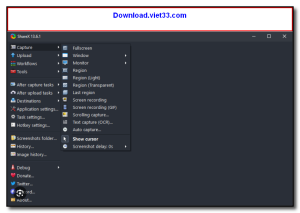
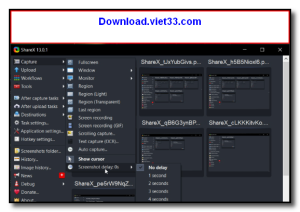
How to Install
- Click the download button above to get the ShareX installer.
- Run the setup file and follow the on-screen instructions to install.
- Launch ShareX — it will appear in your system tray.
- Press Print Screen (or your configured hotkey) to take a screenshot.
- Configure upload destinations and workflows in the Settings menu.
Frequently Asked Questions about ShareX
Is ShareX free?
ShareX is completely free to download and use — no registration or payment required.
What are the system requirements for ShareX?
Minimum requirements: Windows7,8,10,11. A modern PC with at least 2GB RAM is recommended.
What is the latest version of ShareX?
The latest version is 18.0.1, updated on 18/12/2025.
Is ShareX safe to download?
Yes. All software listed on download.viet33.com is sourced directly from the official developer and verified before publishing. No bundled adware or malware.
Does ShareX work on Windows 11?
Yes, ShareX is compatible with Windows7,8,10,11, including Windows 11.
 Download DesktopCalendar 2.3.108.5601
87 Downloads
Download DesktopCalendar 2.3.108.5601
87 Downloads
 Download Hard Disk Sentinel 6.40
73 Downloads
Download Hard Disk Sentinel 6.40
73 Downloads
 Download Windows 10
57 Downloads
Download Windows 10
57 Downloads
 Download Sound Booster 1.2
57 Downloads
Download Sound Booster 1.2
57 Downloads
 Download 3DP Chip 26.06
70 Downloads
Download 3DP Chip 26.06
70 Downloads


