
NSwag is a powerful open-source toolchain for .NET developers that automates the generation of Swagger/OpenAPI documentation and API client code. It bridges the gap between your ASP.NET Core API and frontend or third-party consumers by producing ready-to-use TypeScript, C#, and other language clients directly from your API specification.
NSwag can read existing Swagger/OpenAPI JSON or YAML files, or generate them live from your running .NET assemblies using reflection. It integrates with MSBuild, the .NET CLI, Visual Studio, and can run as a standalone executable — making it suitable for both small projects and large enterprise CI/CD pipelines.
With NSwag, you eliminate the manual work of writing API clients and keeping documentation in sync with your code. The generated clients are strongly typed, follow best practices, and update automatically whenever your API changes.
Key Features
- Generate Swagger 2.0 and OpenAPI 3.0 specifications from .NET assemblies or controllers
- Generate strongly typed C#, TypeScript (Axios, Fetch, Angular, jQuery), and other client code
- Integrates with ASP.NET Core, .NET Framework, NancyFx, and WebAPI projects
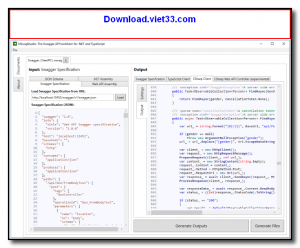
- NSwagStudio GUI for visual configuration and code generation without command line
- MSBuild and .NET CLI integration for automated generation during build
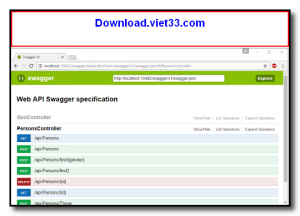
- Middleware support to serve Swagger UI and ReDoc documentation pages
- Open-source with active maintenance and extensive documentation
How to Install
- Click the download button below to get NSwag or install via NuGet:
Install-Package NSwag.AspNetCore - For the standalone GUI tool, download NSwagStudio and install it on your Windows machine.
- Add NSwag middleware to your ASP.NET Core startup to enable OpenAPI spec and Swagger UI generation.
- Configure the document settings (API title, version, security schemes) in your startup code.
- Run your project and navigate to
/swaggerto view the generated interactive API documentation.
Frequently Asked Questions about NSwag – Automatic API Client and Documentation Generator for .NET
Is NSwag – Automatic API Client and Documentation Generator for .NET free?
NSwag – Automatic API Client and Documentation Generator for .NET is completely free to download and use — no registration or payment required.
What are the system requirements for NSwag – Automatic API Client and Documentation Generator for .NET?
Minimum requirements: Windows7,8,10,11. A modern PC with at least 2GB RAM is recommended.
What is the latest version of NSwag – Automatic API Client and Documentation Generator for .NET?
The latest version is 14.6.1, updated on 01/11/2025.
Is NSwag – Automatic API Client and Documentation Generator for .NET safe to download?
Yes. All software listed on download.viet33.com is sourced directly from the official developer and verified before publishing. No bundled adware or malware.
Does NSwag – Automatic API Client and Documentation Generator for .NET work on Windows 11?
Yes, NSwag – Automatic API Client and Documentation Generator for .NET is compatible with Windows7,8,10,11, including Windows 11.
 Download Office Deployment Tool
58 Downloads
Download Office Deployment Tool
58 Downloads
 Download AutoIt
19755 Downloads
Download AutoIt
19755 Downloads
 Download Construct 2
19673 Downloads
Download Construct 2
19673 Downloads
 Download AEdiX Suite
20328 Downloads
Download AEdiX Suite
20328 Downloads
 Download UltraEdit
20055 Downloads
Download UltraEdit
20055 Downloads


