
XX-Net is a free, open-source proxy tool designed to help users bypass internet censorship and access blocked websites and services. It leverages Google App Engine (GAE) and other proxy technologies to provide a fast, encrypted tunnel for web traffic, enabling free and unrestricted internet access from regions with heavy content filtering.
XX-Net runs as a local proxy on your computer and can be configured to work with browsers and other applications via standard HTTP/HTTPS proxy settings. It includes a built-in web interface for managing accounts, checking connection status, and switching proxy modes without needing advanced technical knowledge.
The tool has a large user community and is particularly popular among users who need reliable access to international websites, social platforms, and services that are blocked in their region.
Key Features
- Bypasses internet censorship and geographic content blocks using GAE and other proxies
- Encrypted HTTPS tunnel to protect web traffic from interception and monitoring
- Local HTTP/HTTPS proxy — configure once and works with any browser or app
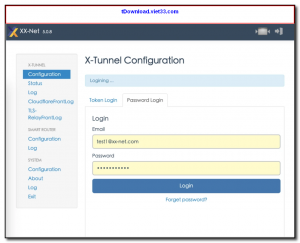
- Built-in web management interface for easy account setup and status monitoring
- Supports multiple proxy modes including direct, GAE, and X-Tunnel
- Cross-platform — available for Windows, macOS, and Linux
- Free and open-source with an active community maintaining it on GitHub
How to Install
- Click the download button below to get the XX-Net package for your operating system.
- Extract the archive to any folder on your computer.
- Run start.bat (Windows) or start (Linux/macOS) to launch XX-Net and the management web interface.
- Follow the setup wizard to configure a Google App Engine account or use community-provided GAE IDs.
- Set your browser proxy to
127.0.0.1:8087(HTTP) or use the built-in browser launcher for instant access.
Frequently Asked Questions about XX-Net – Free Open-Source Internet Censorship Bypass Tool
Is XX-Net – Free Open-Source Internet Censorship Bypass Tool free?
XX-Net – Free Open-Source Internet Censorship Bypass Tool is completely free to download and use — no registration or payment required.
What are the system requirements for XX-Net – Free Open-Source Internet Censorship Bypass Tool?
Minimum requirements: Windows7,8,10,11. A modern PC with at least 2GB RAM is recommended.
What is the latest version of XX-Net – Free Open-Source Internet Censorship Bypass Tool?
The latest version is 5.16.6, updated on 18/10/2025.
Is XX-Net – Free Open-Source Internet Censorship Bypass Tool safe to download?
Yes. All software listed on download.viet33.com is sourced directly from the official developer and verified before publishing. No bundled adware or malware.
Does XX-Net – Free Open-Source Internet Censorship Bypass Tool work on Windows 11?
Yes, XX-Net – Free Open-Source Internet Censorship Bypass Tool is compatible with Windows7,8,10,11, including Windows 11.
 Download DesktopCalendar 2.3.108.5601
87 Downloads
Download DesktopCalendar 2.3.108.5601
87 Downloads
 Download Hard Disk Sentinel 6.40
73 Downloads
Download Hard Disk Sentinel 6.40
73 Downloads
 Download Windows 10
57 Downloads
Download Windows 10
57 Downloads
 Download Sound Booster 1.2
57 Downloads
Download Sound Booster 1.2
57 Downloads
 Download 3DP Chip 26.06
71 Downloads
Download 3DP Chip 26.06
71 Downloads


