
NextDNS is a cloud-based DNS resolver and network protection service that acts as a powerful firewall for your entire internet connection. By routing your DNS queries through NextDNS, you can block ads, trackers, malware domains, and inappropriate content across all devices on your network — without installing any software on each individual device.
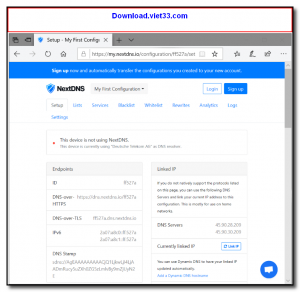
NextDNS supports DNS-over-HTTPS (DoH) and DNS-over-TLS (DoT) protocols, ensuring that your DNS queries are encrypted and cannot be intercepted or monitored by your ISP. The web dashboard gives you detailed analytics on every DNS query made by your devices, showing exactly which domains were queried, blocked, or allowed.
NextDNS offers a generous free tier (300,000 queries/month) and native apps for Windows, macOS, iOS, Android, and Linux for easy setup. It is also supported directly in browsers like Firefox and routers running custom firmware, making it one of the most versatile DNS protection services available.
Key Features
- Blocks ads, trackers, malware, and phishing domains at the DNS level across all devices
- Encrypted DNS via DNS-over-HTTPS and DNS-over-TLS to protect query privacy
- Detailed analytics dashboard showing DNS query logs, blocked domains, and device activity
- Customizable blocklists from dozens of community-maintained ad and malware filter lists
- Parental controls with category-based content filtering for family-safe browsing
- Native apps for Windows, macOS, Linux, iOS, and Android for simple configuration
- Free tier with 300,000 monthly queries — sufficient for most personal and small home network use
How to Install
- Click the download button below to get the NextDNS app for your device or platform.
- Create a free account at nextdns.io to get your unique NextDNS configuration ID.
- Install the NextDNS app and enter your configuration ID to link it to your account.
- Enable NextDNS — all DNS queries on your device are now filtered and encrypted.
- Visit the NextDNS dashboard to customize your blocklists, view analytics, and adjust settings.
Frequently Asked Questions about NextDNS – DNS-Level Ad Blocker and Privacy Protection Service
Is NextDNS – DNS-Level Ad Blocker and Privacy Protection Service free?
NextDNS – DNS-Level Ad Blocker and Privacy Protection Service offers a free trial period. Full features may require a paid license.
What are the system requirements for NextDNS – DNS-Level Ad Blocker and Privacy Protection Service?
Minimum requirements: Windows7,8,10,11. A modern PC with at least 2GB RAM is recommended.
What is the latest version of NextDNS – DNS-Level Ad Blocker and Privacy Protection Service?
The latest version is 1.46.0, updated on 14/10/2025.
Is NextDNS – DNS-Level Ad Blocker and Privacy Protection Service safe to download?
Yes. All software listed on download.viet33.com is sourced directly from the official developer and verified before publishing. No bundled adware or malware.
Does NextDNS – DNS-Level Ad Blocker and Privacy Protection Service work on Windows 11?
Yes, NextDNS – DNS-Level Ad Blocker and Privacy Protection Service is compatible with Windows7,8,10,11, including Windows 11.
 Download DesktopCalendar 2.3.108.5601
87 Downloads
Download DesktopCalendar 2.3.108.5601
87 Downloads
 Download Hard Disk Sentinel 6.40
73 Downloads
Download Hard Disk Sentinel 6.40
73 Downloads
 Download Windows 10
57 Downloads
Download Windows 10
57 Downloads
 Download Sound Booster 1.2
57 Downloads
Download Sound Booster 1.2
57 Downloads
 Download 3DP Chip 26.06
71 Downloads
Download 3DP Chip 26.06
71 Downloads


