
Automa is a free, open-source browser extension for Chrome and Firefox that turns your browser into a powerful automation tool. Using a visual, no-code drag-and-drop workflow builder, you can automate repetitive browser tasks — such as form filling, web scraping, clicking buttons, taking screenshots, and extracting data — without writing a single line of code.
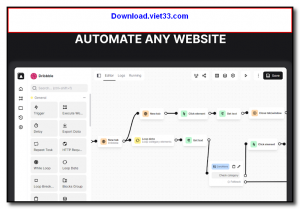
Automa’s workflow editor lets you chain together blocks representing different actions: navigate to a URL, find an element, click it, fill a form, wait for a condition, export data to a spreadsheet, and much more. Workflows can be triggered manually, on a schedule, or by a keyboard shortcut, making it easy to automate daily tasks at any time.
Whether you are scraping data, automating logins, filling out repetitive forms, or building complex multi-step web workflows, Automa provides a fast, accessible, and powerful alternative to paid automation tools like Zapier or Make for in-browser tasks.
Key Features
- Visual no-code drag-and-drop workflow builder — no programming required
- 50+ pre-built action blocks: click, type, scroll, screenshot, loop, condition, and more
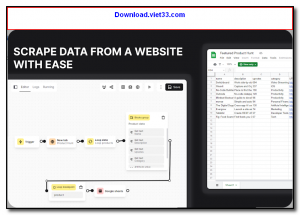
- Web scraping with data extraction to CSV, Google Sheets, or local files
- Schedule workflows to run automatically at set times or intervals
- Trigger workflows via keyboard shortcut, browser event, or URL change
- Share and import community-built workflows from the Automa marketplace
- Open-source and free — available for Chrome and Firefox
How to Install
- Click the download button below to get Automa from the Chrome Web Store or Firefox Add-ons page.
- Click Add to Chrome (or Add to Firefox) and confirm the installation.
- Click the Automa icon in your browser toolbar to open the dashboard.
- Create a new workflow by dragging blocks from the sidebar and connecting them in the visual editor.
- Click Run to test your workflow, or set a schedule for automatic execution.
Frequently Asked Questions about Automa – No-Code Browser Automation Extension for Chrome and Firefox
Is Automa – No-Code Browser Automation Extension for Chrome and Firefox free?
Automa – No-Code Browser Automation Extension for Chrome and Firefox is completely free to download and use — no registration or payment required.
What are the system requirements for Automa – No-Code Browser Automation Extension for Chrome and Firefox?
Minimum requirements: Windows 7/10/11. A modern PC with at least 2GB RAM is recommended.
What is the latest version of Automa – No-Code Browser Automation Extension for Chrome and Firefox?
The latest version is 1.29.12, updated on 13/10/2025.
Is Automa – No-Code Browser Automation Extension for Chrome and Firefox safe to download?
Yes. All software listed on download.viet33.com is sourced directly from the official developer and verified before publishing. No bundled adware or malware.
Does Automa – No-Code Browser Automation Extension for Chrome and Firefox work on Windows 11?
Yes, Automa – No-Code Browser Automation Extension for Chrome and Firefox is compatible with Windows 7/10/11, including Windows 11.
 Download DesktopCalendar 2.3.108.5601
87 Downloads
Download DesktopCalendar 2.3.108.5601
87 Downloads
 Download Hard Disk Sentinel 6.40
73 Downloads
Download Hard Disk Sentinel 6.40
73 Downloads
 Download Windows 10
57 Downloads
Download Windows 10
57 Downloads
 Download Sound Booster 1.2
57 Downloads
Download Sound Booster 1.2
57 Downloads
 Download 3DP Chip 26.06
71 Downloads
Download 3DP Chip 26.06
71 Downloads


